Define what the property must do
Record whether the client needs a home, land, income, workspace, future project, or another use—and which property characteristics are essential to that purpose.
A client searching for a home, land, income property, or another purpose can admire the same listing for completely different reasons. estateTT gives Belize agents one workspace for connecting intended use to the shortlist, the property questions, the appointment, and the follow-up that decides whether the match is still real.
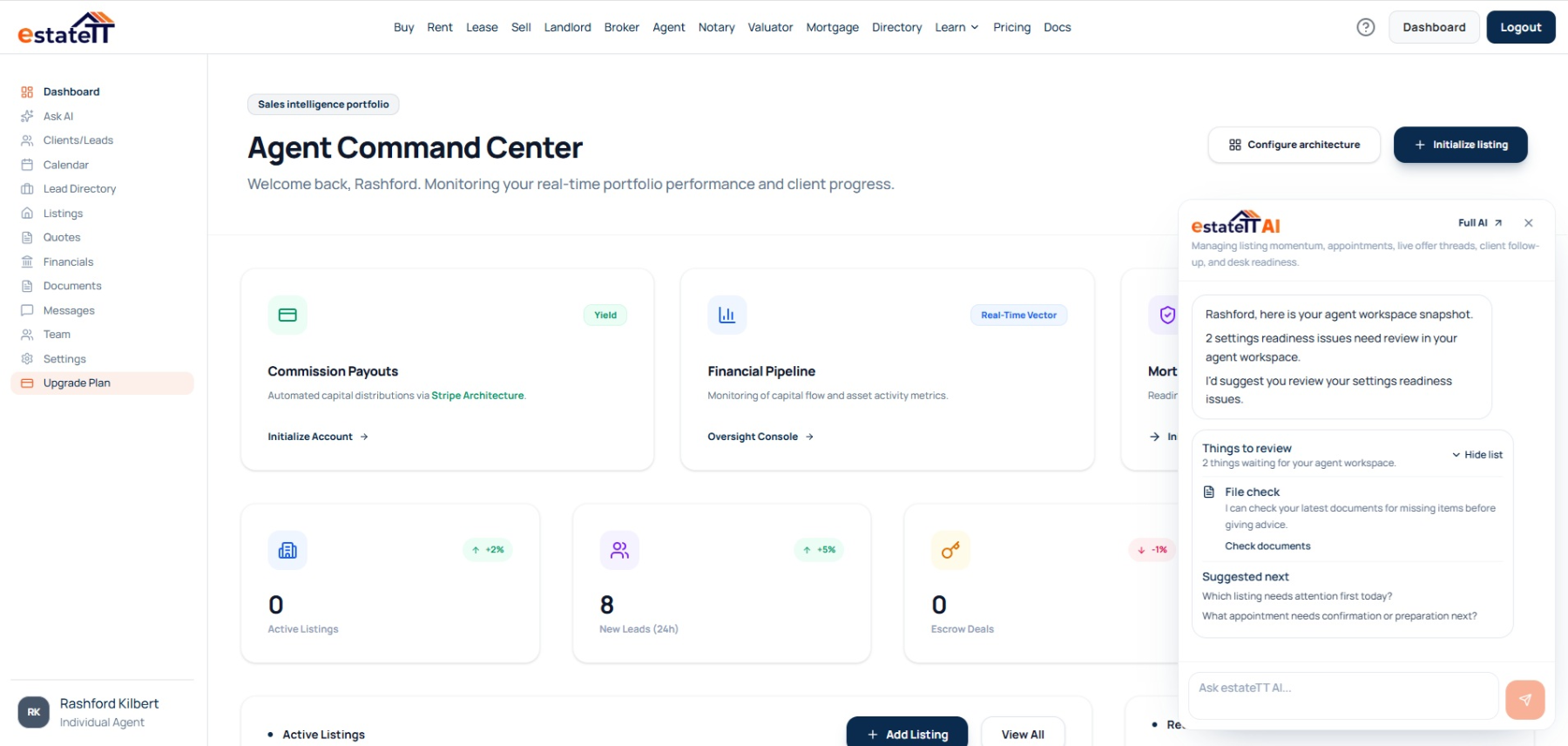
estateTT individual agent account
Belize property purposes, appointments, viewing outcomes, offers, and follow-up
Capture
Record the intended use
Qualify
Test the purpose and fit
Match
Build a purpose-led shortlist
Follow up
Preserve the use test
Move forward
Coordinate the serious file
Start with the intended use
Your Belize client does not need a catalogue of property contexts. They need the agent to remember what this particular property is expected to do for them before every attractive option begins to look interchangeable. The useful brief connects purpose, timing, budget conversation, property type, location preference, access expectations, and responsibilities before the agent starts matching listings.
Record whether the client needs a home, land, income, workspace, future project, or another use—and which property characteristics are essential to that purpose.
Keep access, layout, condition, services, upkeep, documents, seller replies, and other property questions beside the listing when they materially affect the client's intended use.
Attach viewing reactions, media, messages, seller replies, documents, and open questions to the listing so the next comparison reflects whether the property can still serve its intended purpose.
Where a property search loses its purpose
The friction appears when property types are compared without a common purpose, the appointment has no specific test, and every new listing changes the client's priorities again.
Bedrooms, land area, setting, and price do not explain what outcome the client expects. Define the use before treating those features as evidence of a match.
A residence, land purchase, income property, and future project do not raise identical concerns. Keep the questions relevant to this client and this intended use attached to the listing.
If the client changes from immediate use to future plans, personal use to income, or one property type to another, rebuild the comparison instead of carrying forward criteria that no longer fit.
estateTT individual agent account
The Belize agent dashboard keeps listings, clients, appointments, messages, documents, offers, analytics, and financial activity connected to the purpose each property is expected to serve.
That gives you a place to return when a viewing changes the intended use, a property question affects the match, or a serious issue needs qualified input.
Keep the client's purpose, timing, property type, essential characteristics, and deal-breakers in the same working context.
Return to appointment outcomes, client reactions, seller replies, and the property questions that affected the intended use.
Keep offers, supporting documents, and professional questions closer to the Belize property they concern.
Review supported analytics and financial views alongside the Belize searches, property-use tests, appointments, and offers moving through the account.
The Belize agent journey
The account becomes more useful when intended use shapes the brief, each viewing tests the property against that purpose, and serious questions remain connected to the people responsible for answering them.
01
Record the enquiry, intended use, property type, essential characteristics, timing, budget conversation, and next action.
02
Clarify what the property must support and which access, condition, service, responsibility, or document concern could change that fit.
03
Connect the purpose-led brief to relevant Belize listings and give each appointment a specific use test.
04
Keep use-specific reactions, messages, seller replies, media, documents, and open questions attached to the relevant property.
05
Keep the Belize offer, intended-use context, supporting records, and professional replies connected while each person remains responsible for their own conclusion.
Intended use is not a professional conclusion
estateTT helps coordinate what the property is expected to do, what the viewing changed, and what still needs qualified input. It does not confirm suitability, interpret professional evidence, or decide whether the client should proceed.
Use the workspace to preserve the purpose-led brief, property criteria, viewing outcome, and follow-up for the work you are responsible for.
Keep client authority and every legal, lending, valuation, inspection, surveying, planning, construction, and regulatory conclusion with the responsible person.
What the purpose-led Belize agent account helps organize
Keep intended use, property type, essential criteria, and deal-breakers beside the Belize listings under consideration
Return to use-specific reactions, property questions, seller replies, and open work
Keep Belize offers, use-specific messages, and supporting documents beside the property they concern
Review supported Belize activity before the next use test, appointment, or professional conversation
What estateTT does not decide
Treat intended use separately from confirmation of Belize title, boundaries, condition, access rights, approvals, or another party's statement
Turn a purpose-led brief into Belize legal, lending, tax, valuation, inspection, surveying, planning, construction, or regulatory advice
Commit a client or seller without their authority
Let intended-use context replace broker oversight, qualified property checks, or the Belize client's judgment
Account-aware AI
estateTT AI can use supported Belize account activity to return you to the intended-use question, listing, appointment, client reply, document, or offer that needs attention.
Use supported client, appointment, listing, and message context to revisit where the client's purpose became clearer, changed, or stopped fitting the property.
Return to open listing, appointment, seller, document, offer, or client activity without losing why that detail matters to the intended use.
The AI can organize and explain supported Belize activity; it cannot confirm that a property suits its intended use or replace client, agent, brokerage, legal, lending, valuation, inspection, surveying, planning, construction, or regulatory judgment.
Continue from the Belize property purpose
Move from the individual agent account into current Belize listings, brokerage support, or plan information relevant to your practice.
Review the public property inventory your clients may already be exploring.
Choose the broker route when Belize property-use briefs, appointments, and follow-up are distributed across linked agents or supervised by a team.
Review the professional subscriptions before creating the Belize individual agent workspace.
Questions about purpose-led Belize searches
This page leads to the individual_agent account. Broker owners and teams should use the broker route so the account structure matches how their Belize practice operates.
Use the individual account for Belize listings, clients, appointments, messages, documents, offers, analytics, financial views, and workspace settings.
Yes. Keep each client's intended use, property type, listing activity, appointment outcomes, seller replies, messages, and documents closer to the relevant property.
Update the brief and rebuild the comparison around the new purpose. A property that suited one use should not remain on the shortlist automatically when the client's objective changes.
No. estateTT organizes the Belize purpose-led brief and its follow-up; clients, agents, brokers, attorneys, valuators, lenders, inspectors, surveyors, and other qualified professionals remain responsible for suitability checks, advice, representations, and decisions.
A useful Belize shortlist gives every property a reason to remain.
Create your individual agent account and keep the intended use, client brief, listing, appointment outcome, document, message, and offer ready for the next conversation.
estateTT is a technology provider that delivers specialized workflow and organization tools for real estate platform participants in Belize. estateTT is not a real estate agency, brokerage, legal firm, or financial institution. The platform does not make title, lending, landholding-license, fee, deposit, or transaction-outcome decisions. While the platform reserves the right to review participants to maintain network quality, it does not certify professional credentials or replace independent checks. Users are solely responsible for independently verifying all transaction details, licensing, and legal requirements with qualified local professionals and relevant Belize regulatory authorities before engagement.