Know who can see and do what
Set up the brokerage team with role-aware access so staff, analysts, managers, and administrators work from the visibility appropriate to their responsibility.
After a busy run of viewings, calls, seller updates, and buyer questions, the brokerage should not need another round of messages just to understand what moved. estateTT gives owners and managers a shared operating view while agents continue handling the relationships and listings assigned to them.
estateTT brokerage account
Team, listings, offers, reports, and handoffs
Set up
Create the brokerage team
Connect work
Bring listings and activity in
Review signals
See what needs attention
Resolve gaps
Clarify ownership and handoffs
Lead forward
Support the responsible people
Start with the operating picture
The useful management question is not whether the team is busy. It is which listing, client, offer, or handoff needs leadership now. estateTT keeps brokerage activity close enough to the underlying records for owners and managers to review the business with context.
Set up the brokerage team with role-aware access so staff, analysts, managers, and administrators work from the visibility appropriate to their responsibility.
Move from the portfolio view into team listings, pending offers, client messages, documents, appointments, and unresolved work without rebuilding the story from separate updates.
Use reports, analytics, financial activity, notifications, and team context to decide which conversation needs support, authority, or a clearer owner.
Where opportunity starts to leak
The warning signs are often ordinary: a seller is waiting, an offer has no visible owner, a document request is sitting in a chat, or management learns about a gap after the client follows up.
If the next action exists only in an agent's messages or memory, the brokerage cannot support the client or the agent without asking for the whole story again.
Portfolio numbers matter, but they do not explain why a listing is quiet, which offer needs attention, or where a handoff has stopped moving.
When responsibility changes, listings, appointments, conversations, documents, and other open work need a deliberate handoff rather than an informal introduction.
The estateTT brokerage workspace
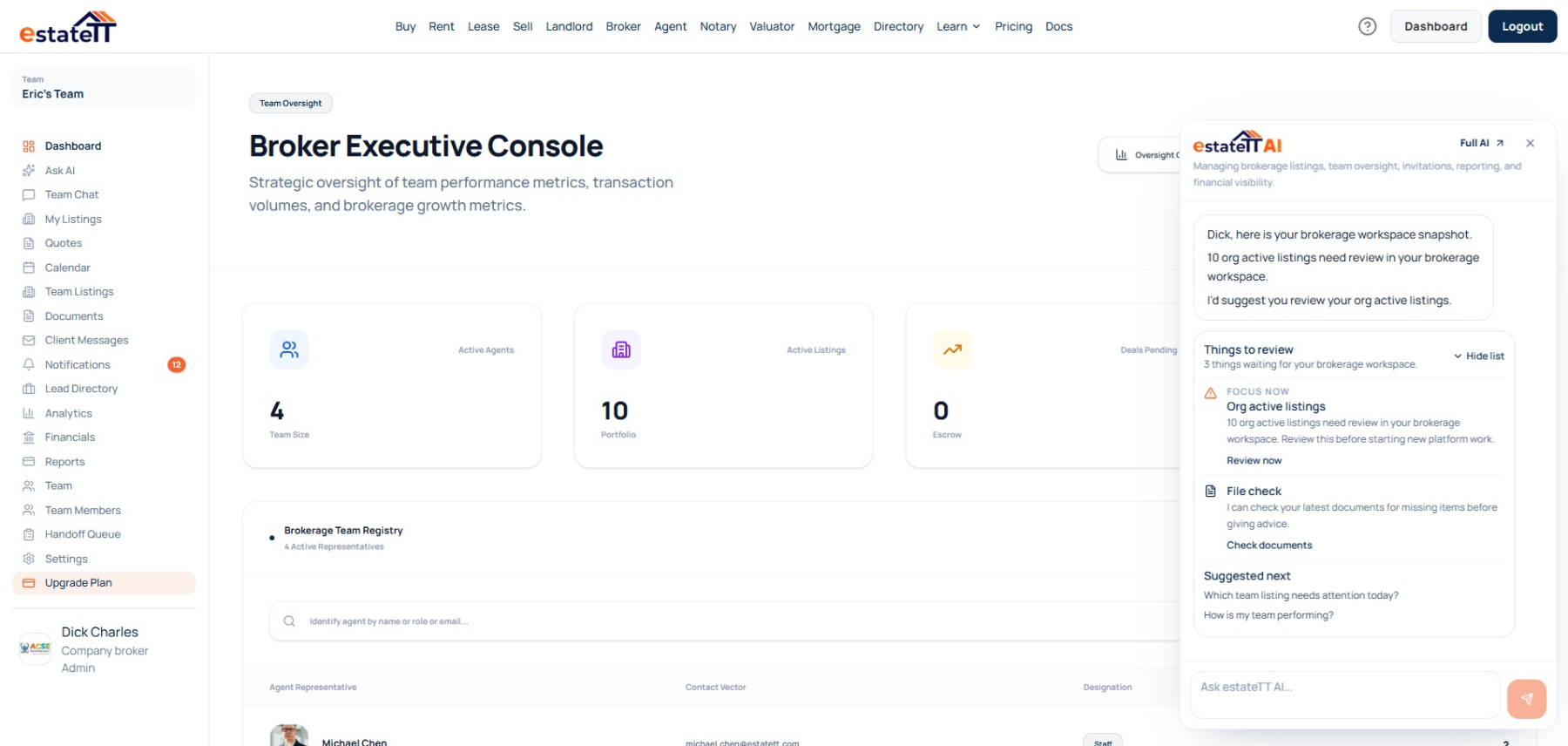
The company broker account connects team membership, brokerage listings, offers, messages, documents, calendars, notifications, reporting, analytics, and financial activity around the business being managed.
Permission-aware views keep the workspace useful at different levels of responsibility. Agents can continue executing their work while brokerage leadership reviews the wider operating picture.
If a team member leaves, administrators can review unresolved handoff work and assign responsibility with the relevant property and client context still attached.
Review membership, invitations, roles, and the work assigned across the brokerage without treating every user as an administrator.
Move from brokerage and personal listings into the offers, messages, documents, appointments, and follow-up surrounding them.
Use reports, analytics, financial records, notifications, and account-aware prompts as starting points for the right management conversation.
Review unresolved work after an offboarding event and deliberately assign what another team member must take forward.
The brokerage journey
The workspace becomes more useful as team access, listing activity, management signals, unresolved gaps, and accountable follow-up stay connected.
01
Create the company brokerage and organize team access around each person's responsibility.
02
Bring brokerage listings, offers, messages, documents, appointments, and notifications into view.
03
Use team, reporting, analytics, financial, and account-aware context to identify what deserves attention.
04
Clarify ownership, follow up on open work, and assign handoffs when responsibility changes.
05
Support the responsible agent or professional with the context needed for the next conversation.
Visibility does not transfer judgment
estateTT gives brokerage leadership a wider operating view. It does not become the owner, manager, agent, client, attorney, valuator, lender, inspector, or regulator responsible for the decision.
Use the workspace to review the business, support the team, and act within the authority attached to your brokerage role.
Keep assigned execution with responsible agents, client authority with clients, and legal, financial, valuation, lending, inspection, and regulatory conclusions with qualified people.
What the brokerage account helps organize
Organize brokerage membership, invitations, roles, and team responsibility
Review company and personal listings with offers and supporting activity
Keep messages, documents, calendars, reports, analytics, and financial context accessible
Review and assign unresolved handoff work when team responsibility changes
What estateTT does not decide
Verify licensing, compliance, title, condition, or another party's representations
Approve offers, set commissions, or make client decisions without the required authority
Give legal, lending, tax, valuation, regulatory, or other professional advice
Replace Trinidad and Tobago brokerage leadership, responsible agents, qualified professionals, or client judgment
Account-aware AI
estateTT AI can use supported account context to surface brokerage signals such as active or draft listings, pending offers, team membership, invitations, financial activity, and unread updates. The broker still decides what those signals mean and what should happen next.
Bring relevant listing, offer, team, and activity signals into view before the broker begins asking the team for updates.
Use account-aware prompts to notice stale follow-up, pending invitations, unread activity, or other supported items that may deserve review.
estateTT AI does not rank agents, approve offers, set commissions, make compliance decisions, or replace legal, financial, valuation, lending, or brokerage judgment.
Continue through the right route
A brokerage owner, an independent broker, and an executing agent do not need the same account structure. Use the next route that fits the responsibility you are taking on.
See how an individual agent captures client context, manages listings, coordinates appointments, and follows activity forward.
Compare the plan options that support professional and company brokerage access.
Review how estateTT approaches brokerage operations across the wider platform.
Questions before you start
Choose the company broker account when you are setting up brokerage membership, shared oversight, and team responsibility. Choose the independent broker account when you operate alone and do not need the company team structure.
No. The company broker workspace uses role-aware access. Staff, analysts, managers, and administrators receive different visibility and authority according to the account structure and enabled product features.
Supported views include brokerage and personal listings, team activity, offers, messages, documents, calendars, notifications, lead-directory activity, analytics, financials, reports, and team administration. Exact access depends on role and subscription features.
The offboarding workflow can identify unresolved listings, appointments, conversations, valuation assignments, notary sessions, and related handoff items so an administrator can review and reassign responsibility.
No. estateTT AI can surface supported account activity for review. Brokerage leadership remains responsible for management, permissions, compliance, commissions, client decisions, and professional escalation.
A company name can introduce the brokerage. The operating view helps leadership run it.
Create the Trinidad and Tobago company brokerage account, or choose the independent path if the practice is yours alone.
estateTT organizes brokerage activity and account context. Brokerage leadership, clients, agents, attorneys, valuators, lenders, inspectors, regulators, and other qualified parties remain responsible for their own representations, advice, checks, permissions, and decisions.